Autonomous Claude Code: Auto Mode, Loops, and What Actually Runs Unattended
Anand B · 2026-08-06
Unattended agents are a gating problem, not a looping problem. The loop is five lines of shell. Deciding what the loop is allowed to land without you watching is the entire design, and it is where every setup I have seen goes wrong.
We run 42 maintenance loops in one monorepo, each one a skill with a schedule, and the thing that keeps them useful is not the automation. It is the set of rules about what they are forbidden to do.
Claude Code auto mode is a classifier, not a switch
Start with the permission mode, because "unattended" begins here. Claude Code has six modes, and Shift+Tab cycles between them mid-session.
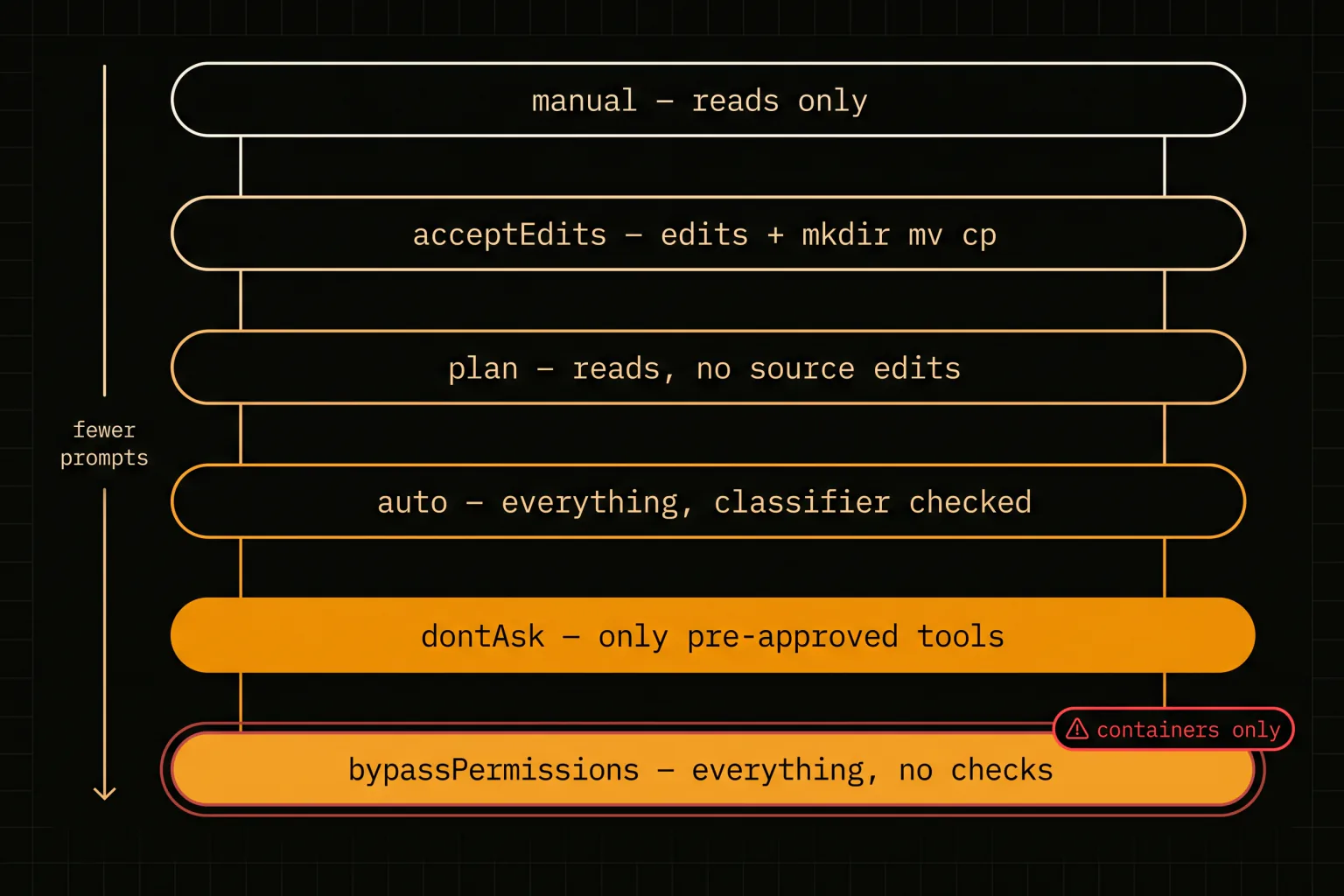
| Mode | Runs without asking |
|---|---|
default (Manual) | Reads only |
acceptEdits | Reads, file edits, mkdir/touch/mv/cp |
plan | Reads, no source edits |
auto | Everything, with background safety checks |
dontAsk | Only pre-approved tools |
bypassPermissions | Everything |
The interesting one is auto, and it is widely misunderstood as "yes to everything". It is not. In auto mode a classifier reviews each action and either lets it run or blocks it, so you get uninterrupted work with a judgement layer still in place.
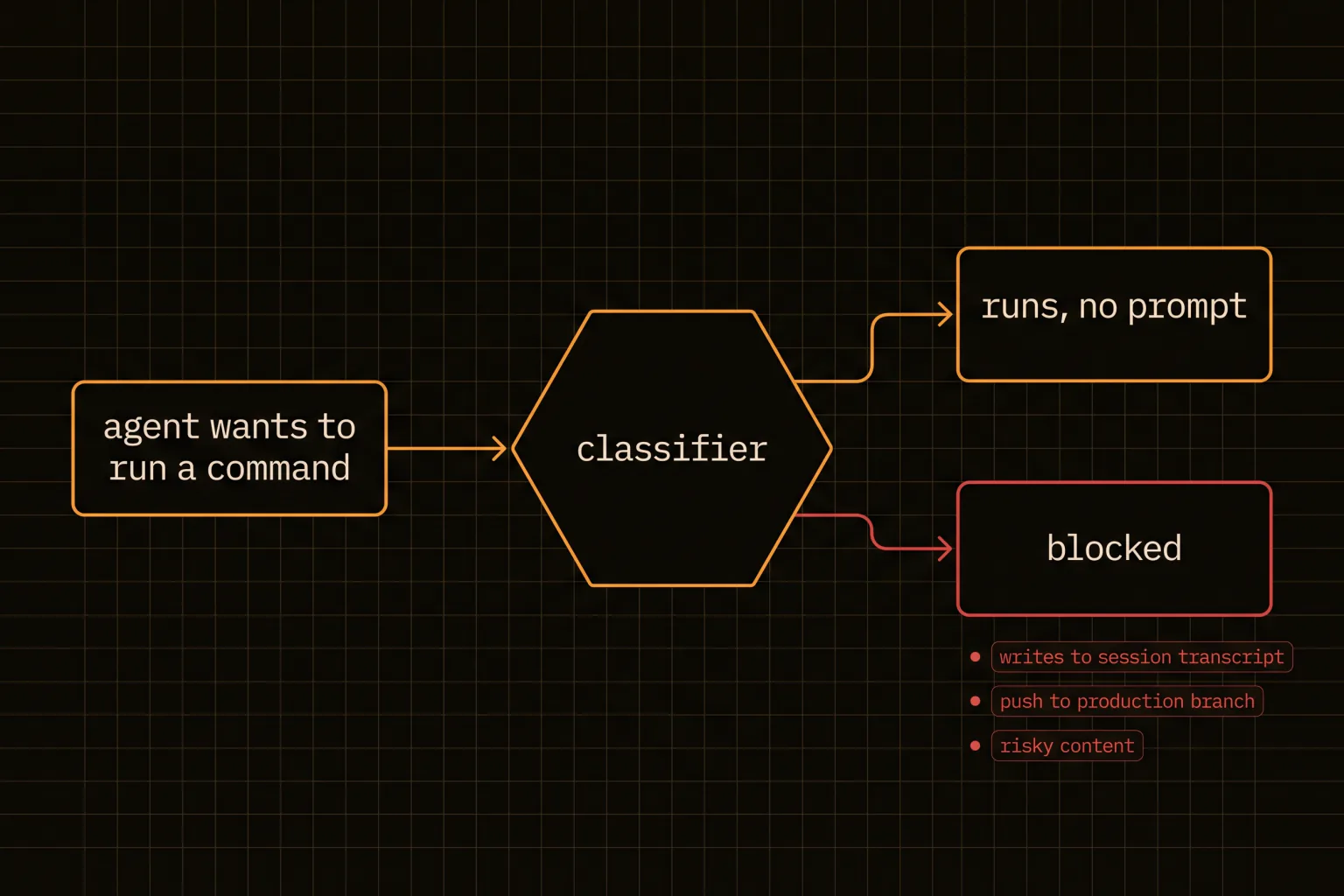
What it blocks is more thoughtful than a static allowlist. Writes to the session transcript files under ~/.claude/projects/ are refused, for instance, because a tampered transcript entry would reach every later safety check once you resume the session. Pushing to a branch of the repo you are working in runs without a prompt, but a push to a deploy-shaped branch like production or gh-pages gets judged on its own terms, and a push whose content looks risky is still blocked.
You can print the whole rule set:
claude auto-mode defaults # full allow/block lists as JSONTwo things to know before you plan around it. Auto mode has account requirements, and on Team or Enterprise an Owner has to enable it before anyone can use it, so it may simply not appear in your Shift+Tab cycle. And defaultMode: "auto" only takes effect from your user settings at ~/.claude/settings.json — Claude Code deliberately ignores it in project and local settings, so that a repository you clone cannot grant itself auto mode. If you set it in .claude/settings.json and nothing happens, that is why, and the behaviour is correct.
Three different things get called a loop
A Claude Code loop can mean three different mechanisms with different lifetimes, and picking the wrong one is the most common mistake.
/loop repeats a prompt inside a running CLI session. It is for polling something: watch a deploy, re-check a flaky test. It dies when you close the terminal.
Routines run on Anthropic-managed infrastructure, which means they keep going with your laptop shut. They can also trigger on API calls or GitHub events, and you create them from the web, the desktop app, or /schedule in the CLI. If your requirement contains the words "at 7am", this is the answer.
Desktop scheduled tasks run on your own machine, with access to your local files and tools. That is the tradeoff: real local access, but your machine has to be on.
| Requirement | Mechanism |
|---|---|
| Poll something for the next 20 minutes | /loop |
| Run at 3am with the laptop closed | Routines |
| Touch local files on a schedule | Desktop scheduled tasks |
| Many independent jobs on your own hardware | Your own runner |
The ralph loop pattern that keeps coming up in searches is the crudest version of the idea: re-run the same prompt against the same task repeatedly and let the agent inch forward each pass. It works better than it sounds for grindy, well-defined work, because each pass starts fresh and does not carry the previous pass's confusion with it.
Its failure mode is equally simple: given a task it cannot finish, it will cheerfully loop forever, and every iteration costs tokens. Any repeat-until-done loop needs 2 things a naive version lacks — a maximum attempt count, and a definition of done that is checkable by something other than the agent's own opinion. while plus a grep for the thing you actually wanted is a better terminator than asking the model whether it is finished, because a model that has been looping for 9 passes is not a reliable judge of its own progress.
Calling any of this a Claude Code autonomous agent oversells it. What you have is a scheduled process with a judgement layer and a stopping rule. That is genuinely useful, and it is a different claim.
What actually survives unattended
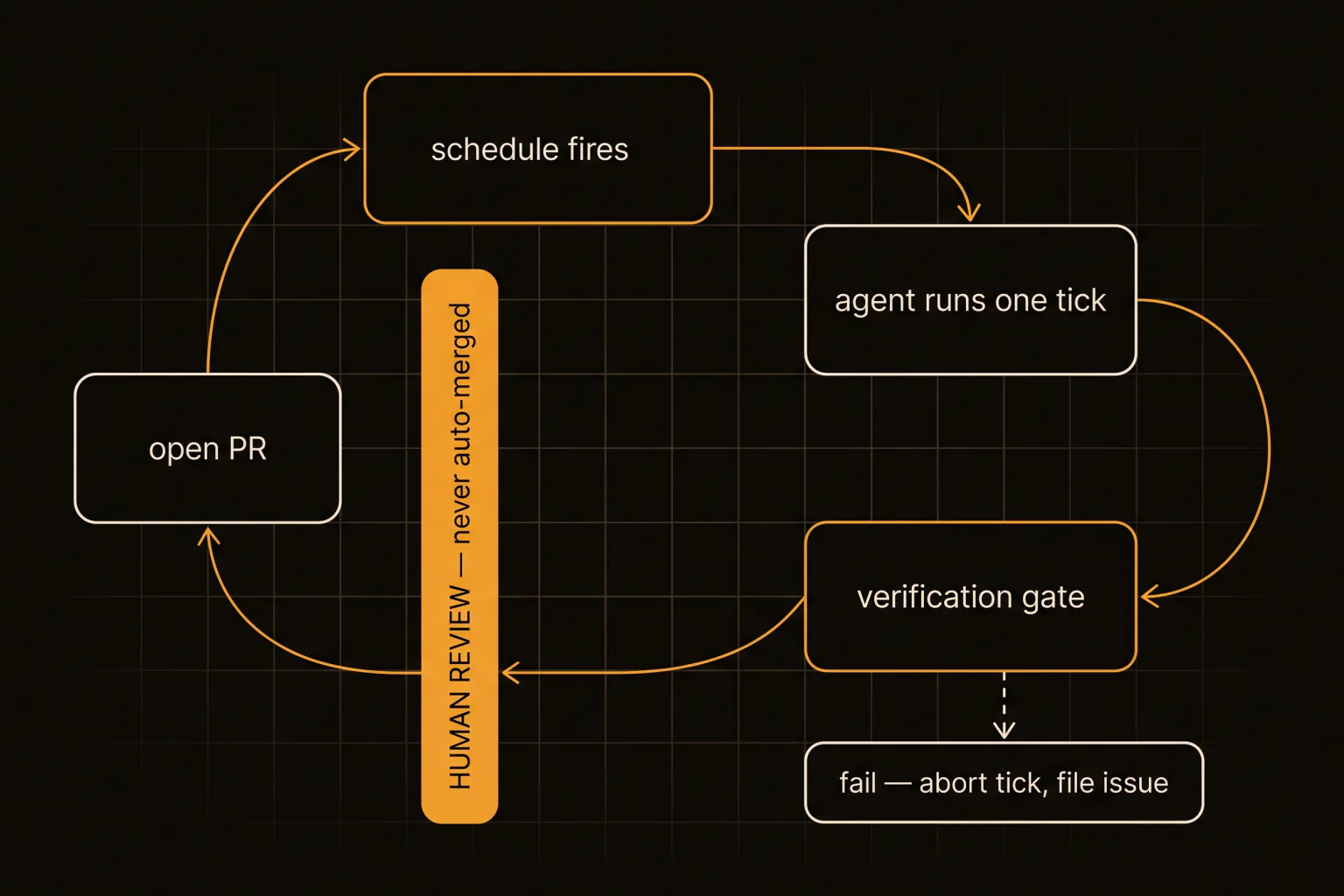
After a lot of ticks, the pattern that holds is narrow. Work suits an unattended agent when it is mechanical, scoped to one thing, and verifiable by a command that exits non-zero when it is wrong. A lint rule burndown. A single missing test. One dependency bump with the suite as the gate.
Work does not suit it when the output can be confidently wrong in a way no command detects. Our content loop is the sharpest example: it generates an article, and the article passes every linter we own while still being able to contain a factually incorrect claim. So that loop opens a pull request and stops. Nothing it produces merges without a person, and the loop file says so explicitly rather than leaving it to convention.
Three rules do most of the work.
One unit per tick. A tick that does one thing produces a reviewable diff. A tick that does five produces a diff nobody reads, and an unreviewed diff is not progress.
A gate that names its command. Not "verify it worked" but the exact invocation and the exact expected result: lint exits 0, npm run typecheck clean, the built file exists and contains the new slug. Vague gates are how a loop produces confident garbage for a week.
An explicit landing rule. Every loop states whether it may merge. Mechanical fixes with a real test gate can auto-merge. Anything touching content, security posture, or public copy opens a PR and waits. Write it in the loop definition, because a rule that lives only in your head stops applying the moment you are not the one running it.
The failure modes worth designing against
A loop that stalls invisibly. An agent waiting at a permission prompt looks exactly like an agent thinking, and you will not notice for hours. Decide the permission posture before you detach, and prefer claude -p for headless work because it is shaped to terminate rather than to wait.
A loop that finds nothing and says nothing. If a tick has no work to do, it should be silent and cheap, not produce a PR restating that everything is fine. Loops that generate noise get muted, and a muted loop is a dead loop.
A loop that ran on stale instructions. The skill said one thing, the codebase moved, and now it confidently does the wrong thing on a schedule. This is the expensive one, because scheduling multiplies it: a wrong manual action happens once, a wrong scheduled action happens every night until someone looks. The mitigation is to have each loop assert something about the repo it can check in one command, so drift surfaces as a failed gate rather than as 30 nights of quietly wrong commits.
A loop with no kill switch. This sounds obvious until you need it at 2am. Ours is a single file: if it exists, every scheduled tick skips, and the runner refuses to start. No scheduler restart, no editing crontabs, no hunting processes. Whatever your equivalent is, build it before the first loop rather than after the first incident, and make it something you can trigger from your phone.
A loop nobody reviews. If PRs accumulate faster than you close them, the loop is not producing work, it is producing a backlog. The fix is fewer loops with tighter gates, and it is the same ceiling that limits parallel agent teams — review throughput, not compute.
Start with one tick you would run by hand
Pick a chore you already do manually, write it as a skill with a real verification command, and run it on a schedule for a week before adding a second. One loop with a --max-attempts ceiling and a gate that exits non-zero teaches you more than 10 loops you have not watched.
Then set the landing rule honestly: if you would not merge that output unread, the loop does not get to either. Ours took a while to converge on that, and the split ended up being roughly 2 categories — mechanical fixes with a real test gate that merge themselves, and everything touching content or public-facing copy that waits for a person.
Autonomy is not the model working alone. It is you having decided in advance, in writing, what "alone" is allowed to include.