Claude Code Desktop App Options on macOS
Anand B · 2026-07-29
If you last looked at this in early 2026, the answer has changed. There is now an official Claude Code desktop app, it runs on macOS and Windows, and it does several of the things people used to install a third-party GUI for. Any article telling you the terminal is your only first-party option is out of date, including the version of this article we were going to write.
So the useful question is no longer "which GUI should I install". It is "which of the five official surfaces fits the work in front of me, and is there anything left that they do not cover".
The five surfaces Anthropic ships
They all drive the same engine, and they share your CLAUDE.md, your settings, and your MCP servers. Switching surfaces does not mean reconfiguring anything.
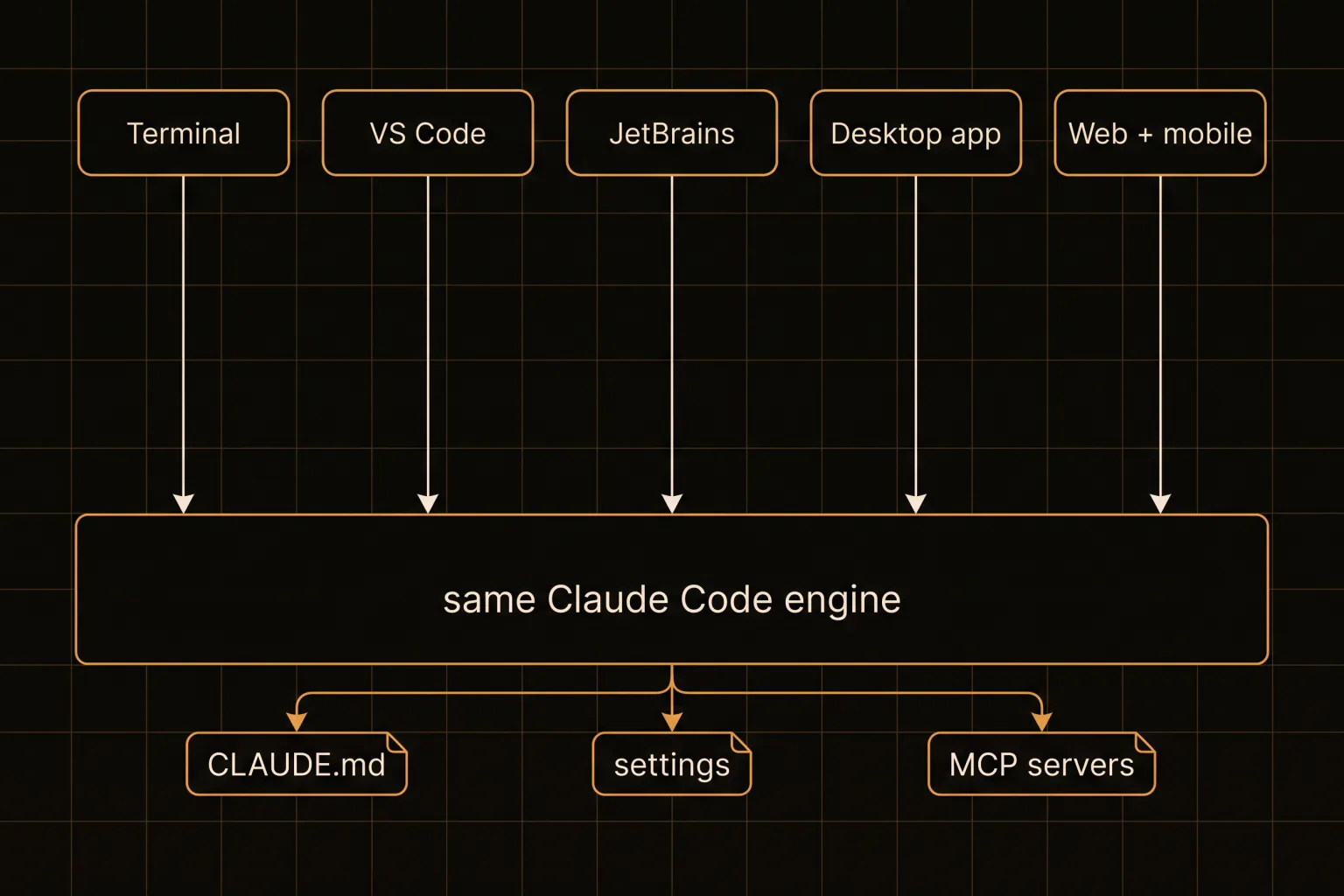
| Surface | Runs on | Best at |
|---|---|---|
| Terminal CLI | macOS, Linux, WSL, Windows | Scripting, piping, CI, everything composable |
| VS Code extension | Anywhere VS Code runs, plus Cursor | Inline diffs, @-mentions, plan review in-editor |
| JetBrains plugin | IntelliJ, PyCharm, WebStorm | Same, for JetBrains users; needs the CLI installed too |
| Desktop app | macOS Intel + Apple Silicon, Windows x64 + ARM64 | Visual diff review, sessions side by side, scheduled tasks |
| Web + mobile | Browser, iOS, Android | Long-running tasks, repos you do not have locally |
Installation is a one-liner on every platform. On macOS either of these works:
curl -fsSL https://claude.ai/install.sh | bash
brew install --cask claude-code
One detail that catches people: Homebrew's claude-code cask tracks the stable channel, which runs roughly a week behind and skips releases with major regressions, while claude-code@latest ships immediately. Neither Homebrew nor WinGet auto-updates, so you own the brew upgrade step. The native installer does update itself in the background.
What the desktop app already covers
This is the part that changed. The Claude Code desktop app is a standalone application, requires a paid subscription, and its own feature list includes visual diff review, running multiple sessions side by side, scheduling recurring tasks, and starting cloud sessions. There is also a background-agents view built specifically for running several full sessions in parallel and watching them from one screen.
If your reason for wanting a Claude Code GUI was any of those four things, you are done. Install the official app and stop reading comparison posts. That is a genuinely better answer than it was six months ago, and it removes most of the historical argument for a third-party wrapper.
Worth being precise about the platform matrix, because it is the one place the official app is narrower than it looks. The desktop app ships for macOS on both Intel and Apple Silicon, and for Windows on x64 and ARM64. There is no Linux desktop build, so Linux users get the terminal, the editor extensions, and the web surface. The /desktop handoff from a terminal session is also documented as macOS and x64 Windows, so it is not universally available even among desktop users.
It also connects back to the terminal rather than replacing it. /desktop continues your current terminal session in the desktop app when you want to look at diffs, and claude --teleport pulls a web or mobile task back down into your terminal. The surfaces are designed to hand work to each other.
Where a third-party tool still has room
Three gaps survive that list, and they are narrower than the marketing of any orchestrator (ours included) would suggest.
Spatial layout. Official surfaces present sessions as a list or a set of panes. Some people think about parallel work spatially: this cluster is the API, that corner is the migration, these two are related because they sit next to each other.
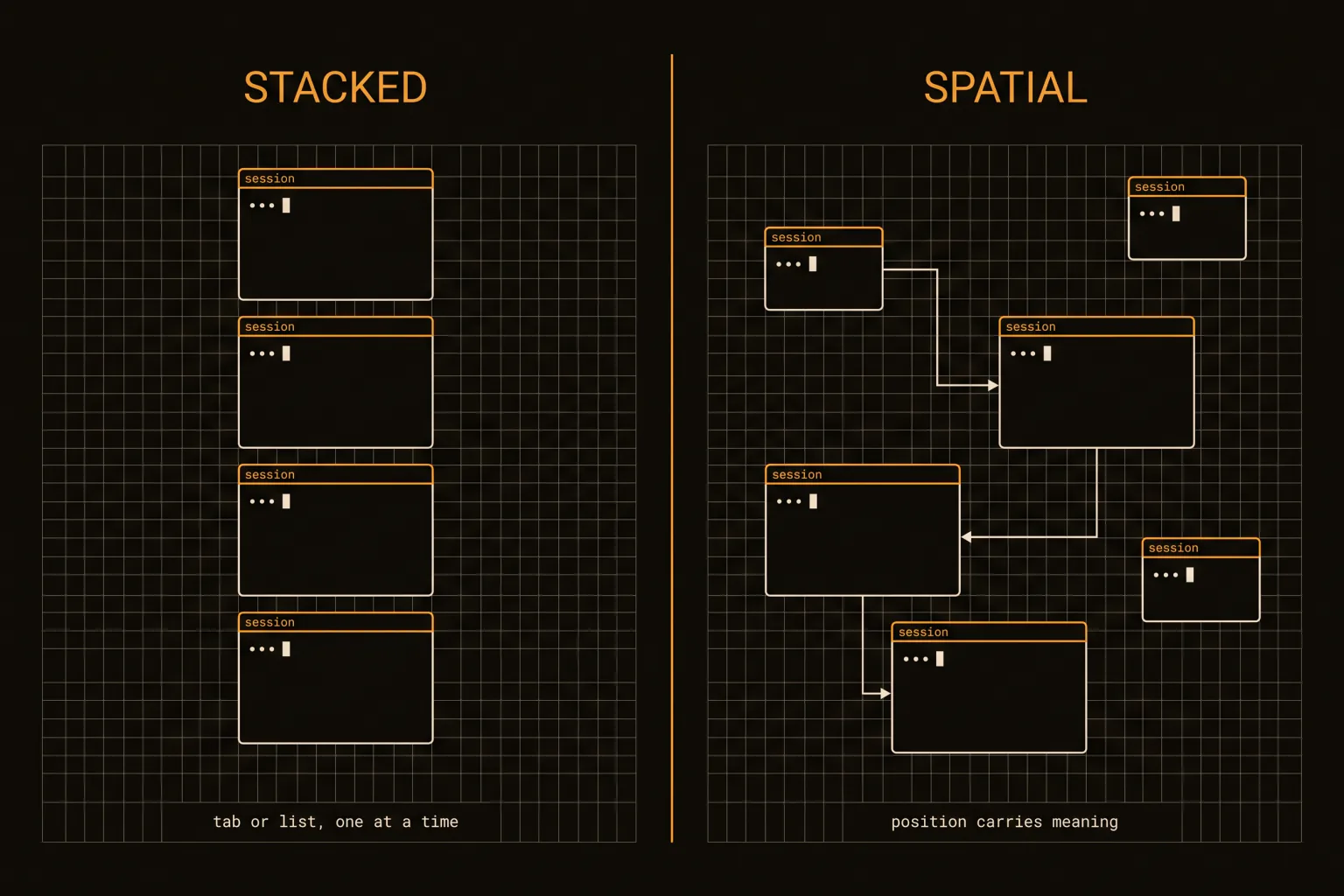
Whether that is worth anything is a genuine preference question, not a feature gap. Plenty of people are perfectly happy with a list, and a list has the advantage of never getting lost. The crossover in our own use is somewhere around 6 concurrent sessions: below that a list is fine, above it we start losing track of which session was doing what, and position becomes a memory aid.
This is also where most community Claude Code UI projects live, and it is worth knowing what you are buying. A third-party UI is a wrapper around the same CLI you already have. It cannot give you a capability the engine lacks, and it inherits every one of the engine's constraints. What it can do is change the shape of the window you look at that engine through.
Isolation per agent. Running several sessions in one checkout is the collision problem, and the fix is a git worktree per agent. Nothing stops you doing that by hand with the official surfaces, and our agent teams walkthrough has the exact commands. A tool that manages the trees for you saves setup, not capability.
Models and hosting. If you need non-Anthropic models in the same workspace, or the work cannot leave your network, first-party hosted surfaces are the wrong shape and self-hosting is the honest answer.
SpeakCode, which we build, sits on those three axes. It is not a way to get multi-session support you cannot otherwise have, and we would rather say so than sell you a gap that closed.
Cowork and OpenClaw are not in this comparison
Both show up in searches next to Claude Code, and neither is a Claude Code GUI.
Claude Cowork is Anthropic's own product: a Claude Code-style agent aimed at general knowledge work over your files and folders, built primarily for non-technical users. It launched as a macOS desktop app in January 2026 and reached web and mobile for Max subscribers in July. If your task is reconciling a spreadsheet or assembling a deck, that is the right tool, and it is not competing for your terminal.
OpenClaw is an open-source, self-hosted personal assistant framework, formerly called ClawdBot before a trademark dispute forced the rename. It wires a model to your tools and messaging apps, polls on a heartbeat so it can act without prompting, and distributes capabilities through its own hub. It passed 360,000 GitHub stars within about five months. Also not a coding GUI.
Treat both as adjacent products that happen to share a search results page.
Choosing, in two questions
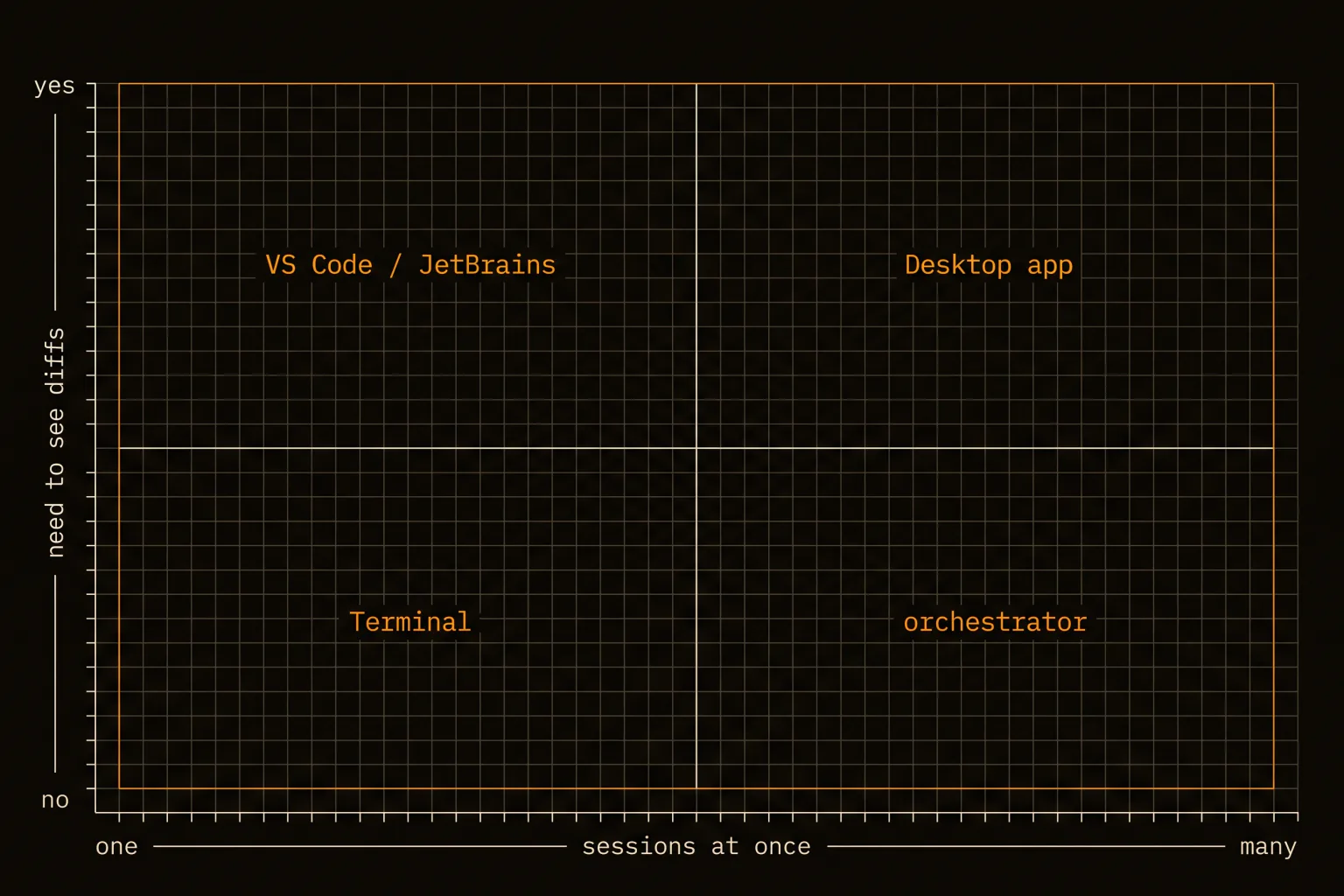
Ask how many sessions you run at once, and whether you need to see diffs visually.
One session, no visual diffs: the terminal, and nothing else. It is the most capable surface, it is the only one that pipes, and every scripted or CI use of Claude Code goes through it. Things like tail -200 app.log | claude -p "flag anything anomalous" only exist here.
One session, want diffs: whichever editor you already have open. The extension is strictly less friction than a separate app, and on VS Code it also installs into Cursor.
Many sessions: the Claude Code app, with background agents if you want them all on one screen. Note the JetBrains plugin still needs the CLI installed alongside it, so on that path you end up with 2 things to keep updated rather than 1.
Many sessions plus worktree isolation, a spatial layout, or mixed models: this is the only case where a third-party tool earns the install, and it is a smaller slice of readers than posts like this usually pretend.
There is a fifth case worth naming because it is easy to miss: work you want running while your machine is off. That is not a GUI question at all. Routines run on Anthropic-managed infrastructure and keep going regardless of your laptop, and claude --cloud starts a task locally to continue on mobile. Reaching for a desktop wrapper to solve an availability problem is a category error.
Try the official app before you shop
Install the desktop app first. It runs against the subscription you already need, it now covers side-by-side sessions and visual diffs, and it will tell you within an afternoon whether your problem is actually solved. Shop for something else only after you can name the specific thing it would not do.
Six months ago that advice would have been wrong, which is the real warning here. Between 2026-07-18 and 2026-07-26 alone, the official surface list grew enough to invalidate the argument this article was originally going to make. Check the code.claude.com/docs overview page yourself before trusting any comparison, including this one, and treat any post that does not name its verification date as unreliable.