Claude Code Plugins and the Marketplace: How They Differ From Skills
Anand B · 2026-08-04
A plugin is not a different kind of thing from a skill. It is a wrapper around skills, agents, hooks and MCP servers that makes them shareable, versioned, and installable by someone who is not you. Once you see it that way, the whole "should this be a skill or a plugin" question collapses into a distribution question.
Claude Code plugins matter because they are how the ecosystem moves code between people. A skill in your .claude/ directory helps you. The same skill inside a plugin helps your team, and can be pinned to a version.
What a plugin actually contains
A plugin is a directory. The only required-ish piece is a manifest at .claude-plugin/plugin.json carrying a name, a description, and optionally a version.
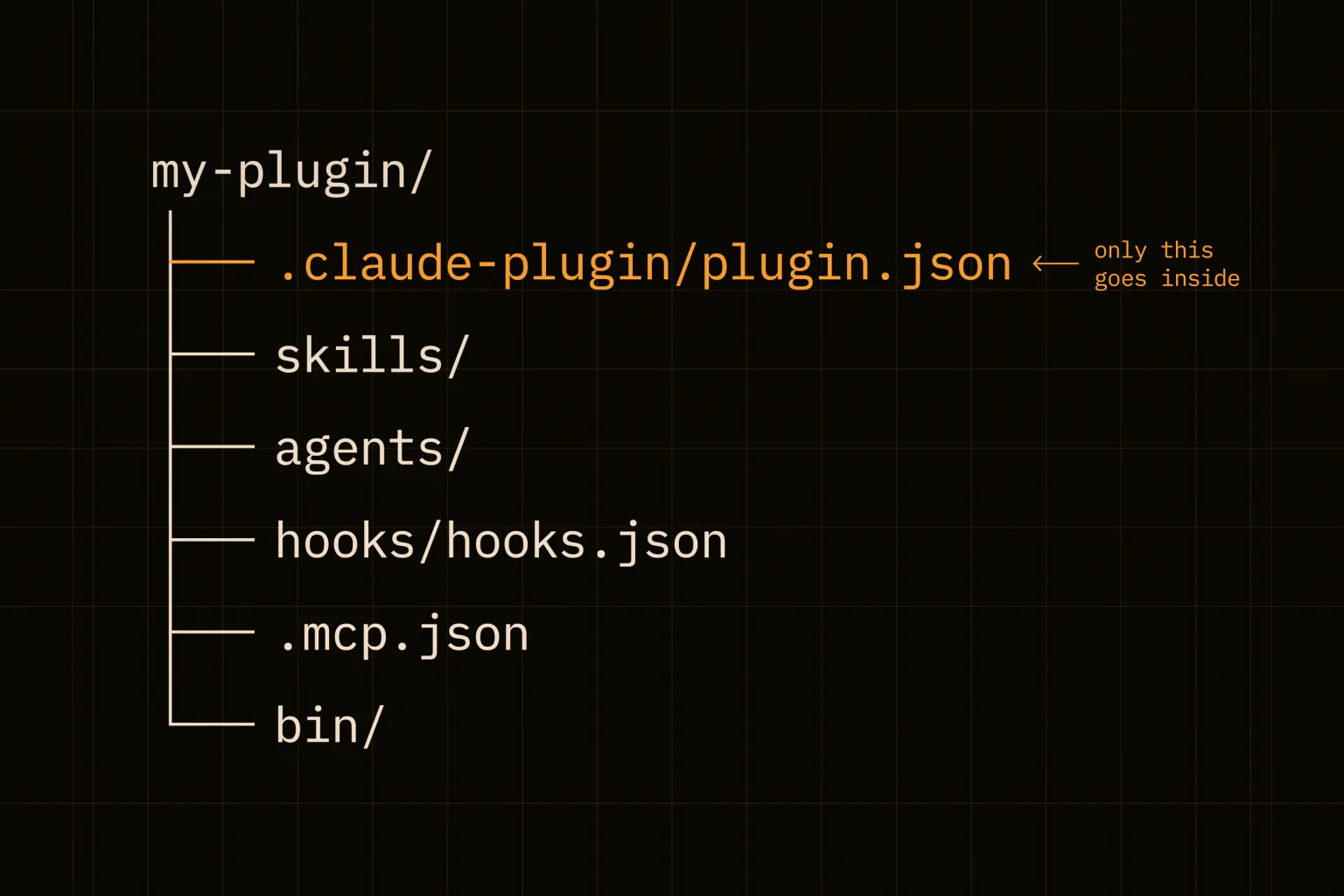
Everything else lives at the plugin root, and there is more available than most people realise:
| Path | What it holds |
|---|---|
.claude-plugin/plugin.json | Manifest: name, description, version, author |
skills/<name>/SKILL.md | Skills, model-invoked based on their description |
agents/ | Custom agent definitions |
hooks/hooks.json | Event handlers, same format as settings.json |
.mcp.json | MCP server configuration |
.lsp.json | Language servers for code intelligence |
monitors/monitors.json | Background watchers that notify Claude as events arrive |
bin/ | Executables added to the Bash tool's PATH while enabled |
The single most common mistake is putting skills/, agents/, or hooks/ inside .claude-plugin/. Only plugin.json goes in there. Everything else is a sibling of that directory, not a child.
Two of those rows are worth pausing on. bin/ means a plugin can ship real executables onto the PATH, and monitors/monitors.json means a plugin can start a background process that tails a log and pushes lines to Claude as notifications. Neither is what people picture when they hear "plugin", and both are reasons to read a plugin before installing it.
Standalone or plugin
The mechanics are the same either way. What changes is naming and distribution.
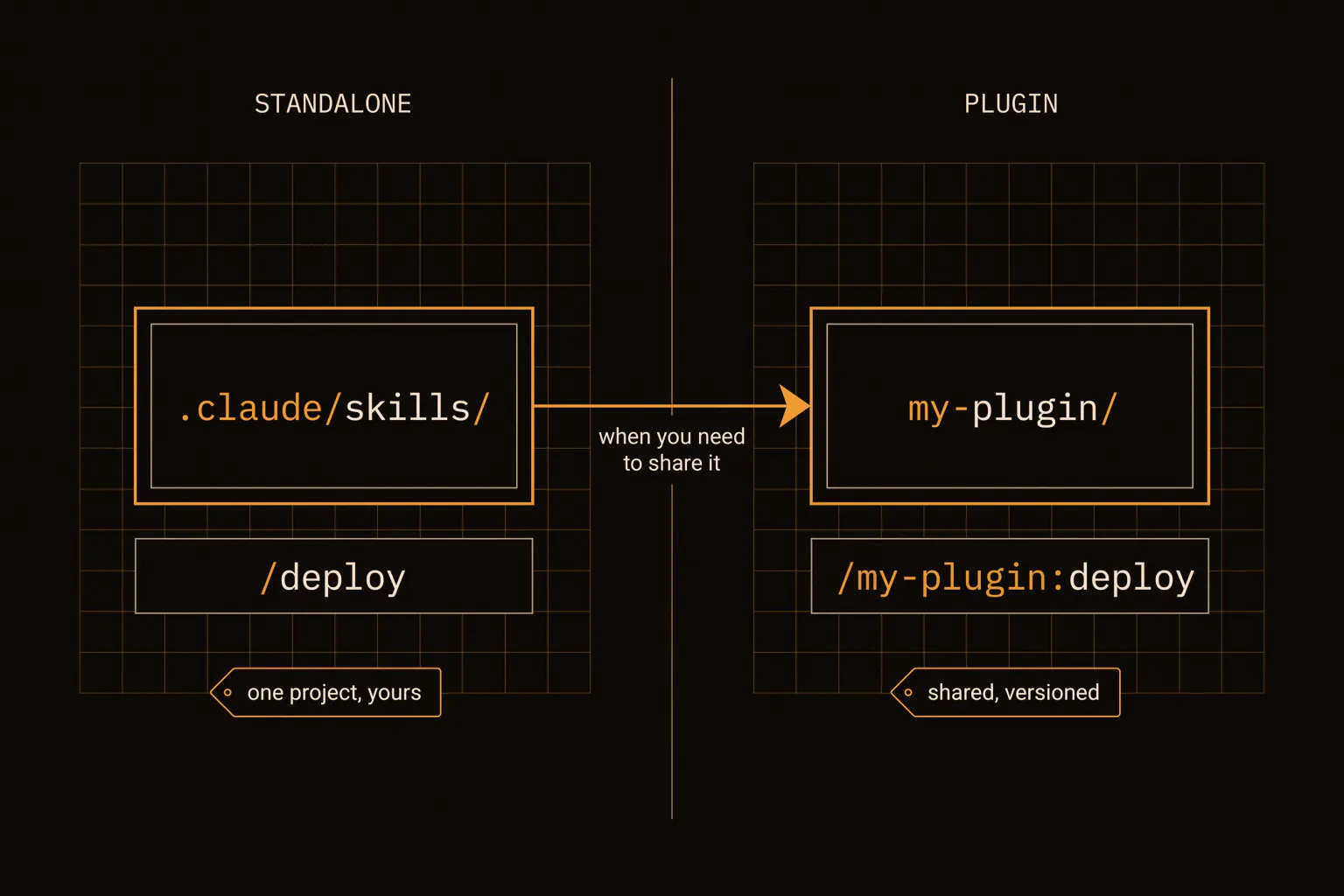
A standalone skill in .claude/skills/deploy/SKILL.md is invoked as /deploy. Move it into a plugin named my-plugin and it becomes /my-plugin:deploy. That namespacing exists so two installed plugins can both ship a skill called deploy without colliding, and it is the main ergonomic cost of packaging: your Claude Code commands get longer.
The practical rule is to start standalone and convert when you need to share. Iterating on a skill is faster when it is a loose file in the project you are already working in, and you cannot know the right shape for a playbook until you have run it a few times.
Migration is mostly copying. Manifest, then cp -r .claude/skills my-plugin/, then move the hooks object out of settings.json into hooks/hooks.json — the format is identical. One trap on the way out: project and user .claude/agents/ definitions override same-named plugin agents, so if you leave the originals in place the plugin version silently never takes effect. Skills behave differently again, because the namespaced plugin copy and the original /deploy both remain available rather than one shadowing the other. Delete the originals after migrating.
Testing without installing
You do not need a marketplace to run a plugin. Point Claude Code at a directory:
claude --plugin-dir ./my-plugin
/reload-plugins          # after each edit, no restart needed
The flag can be repeated for multiple plugins, and it accepts a .zip archive as of v2.1.128. There is also --plugin-url for a hosted archive, which is handy for testing a CI build artifact, and it loads for that session only.
A local --plugin-dir plugin takes precedence over an installed marketplace plugin with the same name, so you can test changes to something you already have installed without uninstalling it first.
If you would rather not pass a flag every launch, claude plugin init my-tool scaffolds a plugin into ~/.claude/skills/my-tool/ with a manifest and a starter SKILL.md, and it auto-loads on the next session as my-tool@skills-dir with no install step at all. That is the lowest-friction path from idea to working plugin.
The two marketplaces
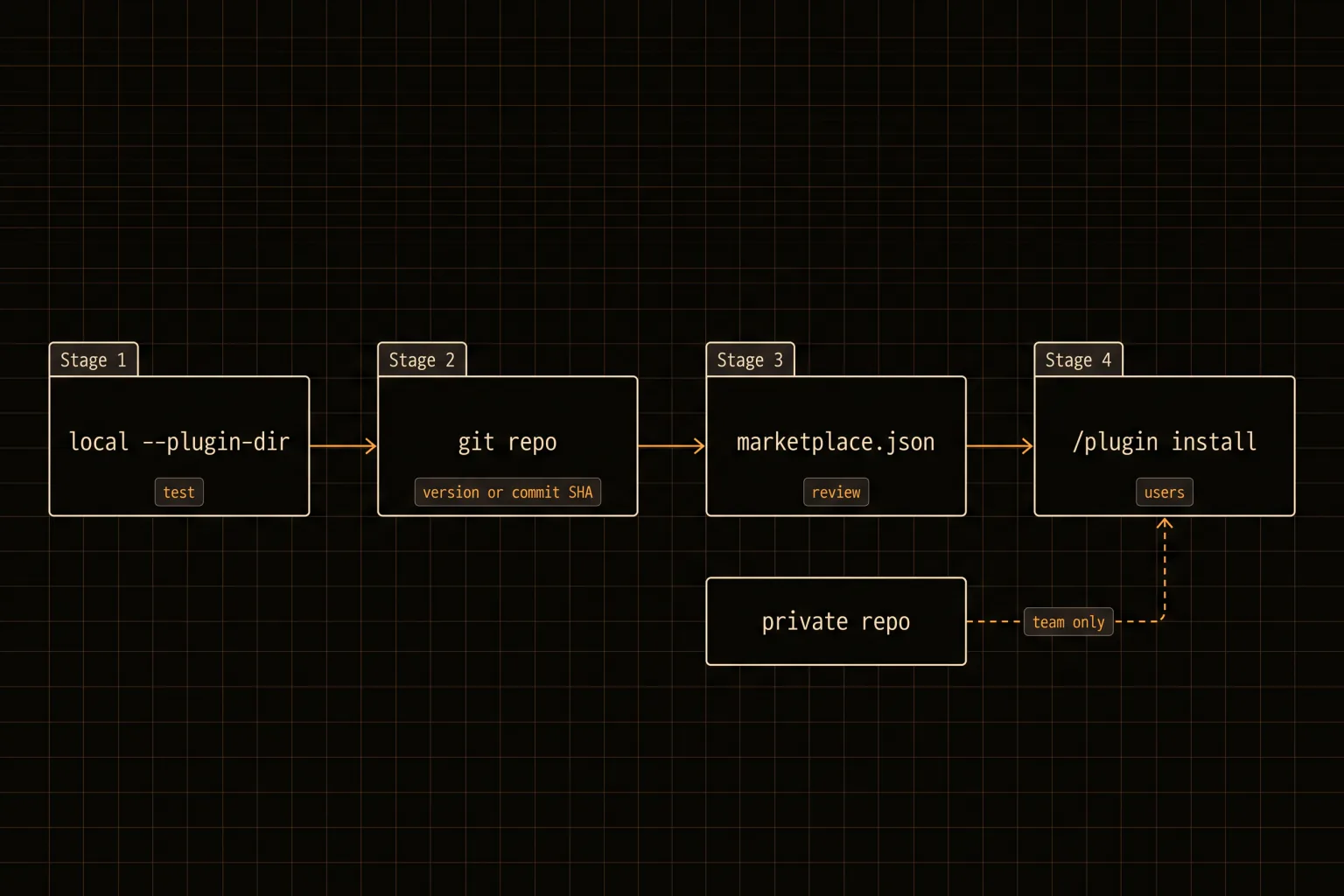
Anthropic runs 2 public catalogs, and a Claude Code marketplace is just a marketplace.json catalog pointing at plugin repositories — which is why you can host your own.
claude-plugins-official is curated by Anthropic and registered automatically the first time you start Claude Code interactively. There is no application process; inclusion is at Anthropic's discretion.
claude-community is the public community catalog where third-party submissions land after review. Users add it explicitly and install from it:
/plugin marketplace add anthropics/claude-plugins-communityApproved community plugins get pinned to a specific commit SHA, CI bumps the pin as you push, and the public catalog syncs nightly — so expect a delay between approval and being installable. Run claude plugin validate before submitting, because the review pipeline runs the same check.
For anything internal, skip both. A Claude Code plugin marketplace can live in a private repository, which is the right answer for company-specific plugins that should never be public. This is the underrated option: a private catalog gives a team versioned, installable tooling with none of the review latency, and it is the setup most companies actually want rather than a public submission.
Submission itself goes through an in-app form rather than a pull request — either on claude.ai, which needs a Team or Enterprise organisation with directory management access, or through the Console form, which is the path for individual authors without an organisation.
Versioning has one sharp edge. If you set an explicit version in the manifest, users only get updates when you bump it. If you omit it and distribute via git, the commit SHA becomes the version and every commit is a new version for your users. Pick deliberately; the default is noisier than most authors want.
Install nothing you have not read
A plugin can ship hooks that run shell commands on your machine, MCP servers that reach external services, executables on your PATH, and background monitors that start automatically. That is a broad grant, and installing from a community catalog is a trust decision, not a convenience one.
The review pipeline and automated safety screening reduce the risk; they do not remove it. Before installing anything from outside your organisation, read hooks/hooks.json, check what .mcp.json connects to, and look at whether bin/ exists. It takes 2 minutes and the plugins worth installing are the ones that survive the read.
There is a second-order version of this worth thinking about. A plugin distributed without an explicit version tracks its git commit SHA, which means the code you audited on Monday is not necessarily the code running on Friday. If you are installing something into a team's workflow, prefer plugins that pin an explicit version, and treat a plugin that updates on every upstream commit as a dependency you have not really reviewed. The same logic you would apply to an unpinned npm dependency applies here, with a broader grant of privileges attached.
A plugin can also ship a settings.json that sets an agent key, which activates one of its own custom agents as the main thread — applying that agent's system prompt, tool restrictions, and model choice. That is a plugin changing how Claude Code behaves by default, not just adding a command to it. Worth checking for specifically.
The rule that has held up
Install a plugin when you want somebody else's tool. Write a standalone skill when you are encoding your own process. Package your skill as a plugin at the moment a second person needs it, and not before.
The signal that you got it wrong in one direction is a plugin you have forked and edited locally, which should have been a skill. The signal in the other direction is a skill you have copied by hand into 3 repositories, which should have been a plugin.
If you want the shortest possible path to trying this: run claude plugin init my-tool, put one procedure you already repeat into the generated SKILL.md, and use it for a week before thinking about a marketplace at all. Distribution is the easy part and it is the part everyone starts with. The hard part is having something worth distributing. If you are still deciding whether a procedure deserves to be written down at all, our piece on skills covers that test first.