Running Claude Code Remotely: Web, SSH, and From Your Phone
Anand B · 2026-08-02
The DIY answer to this question is now mostly the wrong answer. If you want Claude Code working while you are away from your desk, Anthropic ships enough first-party surface that reaching for tmux and a droplet should be a deliberate decision rather than the default one.
That is a change worth stating plainly, because most writing about remote Claude Code still assumes you have to build it. You do not, and the self-hosted path is now a narrow specialist choice rather than the obvious one.
What ships in the box
Five separate mechanisms, and they solve genuinely different problems.
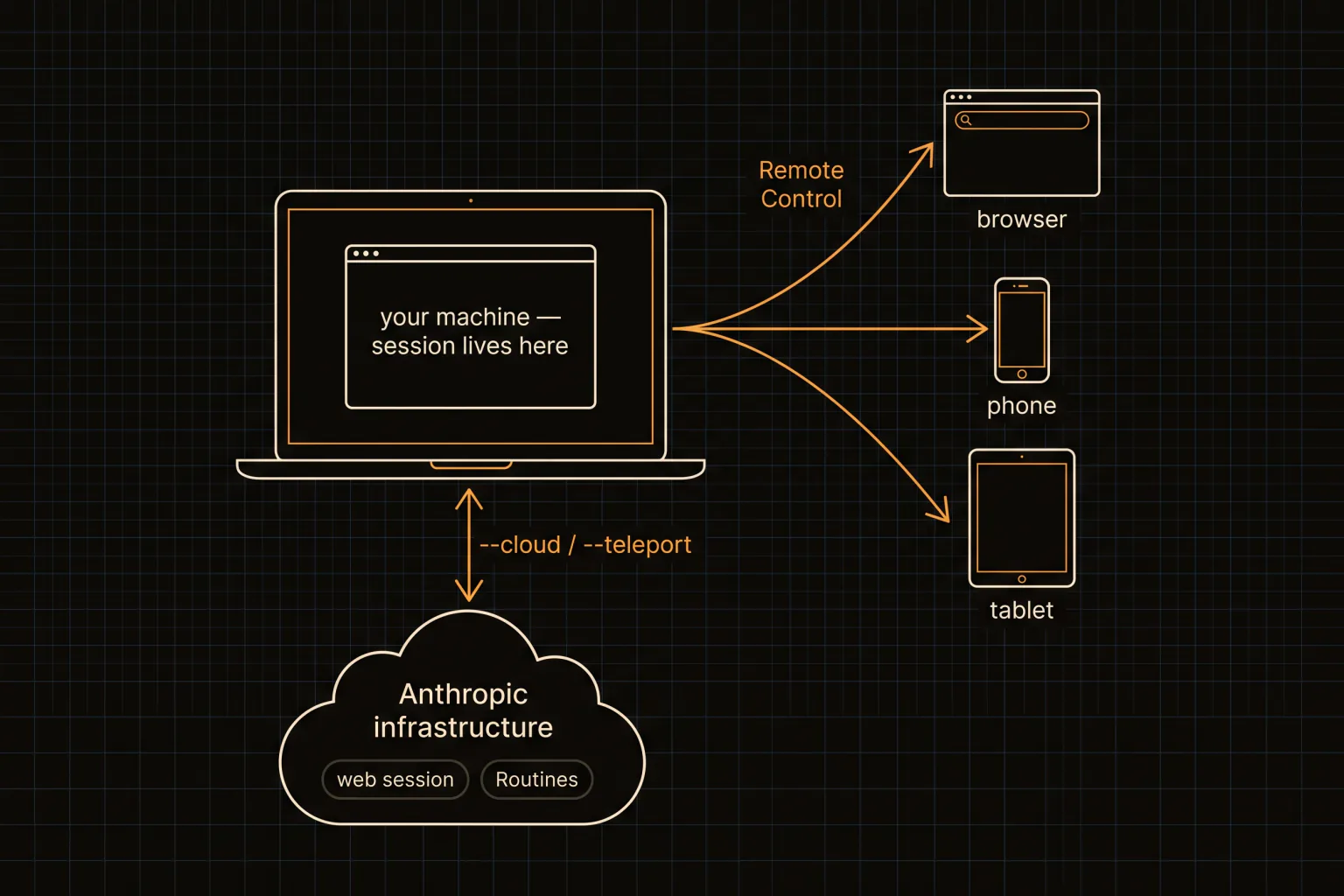
Claude Code Remote Control lets you keep working on a session that lives on your machine from your phone or any browser. The work continues where it started; you are just looking at it from elsewhere. This is the one people build elaborate workarounds for without realising it already exists.
Claude Code web runs at claude.ai/code with no local setup, and it is the right call for long-running tasks or repos you do not have checked out locally. Claude Code mobile access comes through the same Claude app on iOS and Android, reaching the same sessions. Because the execution happens on Anthropic's side, a web session does not care whether your laptop is awake, which is the practical difference from Remote Control.
claude --cloud starts a task from your terminal and continues it on mobile. claude --teleport does the reverse, pulling a web or mobile task down into your terminal; that one needs a claude.ai subscription.
Routines run on Anthropic-managed infrastructure, which is the important bit: they keep running when your computer is off. They can also fire on API calls or GitHub events, and you create them from the web, the desktop app, or by running /schedule in the CLI. If your actual requirement is "this should happen at 7am whether or not my laptop is open", this is the feature, and no amount of SSH gets you there.
Channels push events from Telegram, Discord, iMessage or your own webhooks into a session, and @Claude in Slack turns a bug report into a pull request.
| I want | Use |
|---|---|
| My phone to drive the session on my desk | Remote Control |
| To start something and close the laptop | claude --cloud, or a web session |
| It to run at 3am with my machine off | Routines |
| To pull a cloud task back to my terminal | claude --teleport |
| To trigger work from chat | Channels or Slack |
When self-hosting still wins
Three cases survive, and only three.
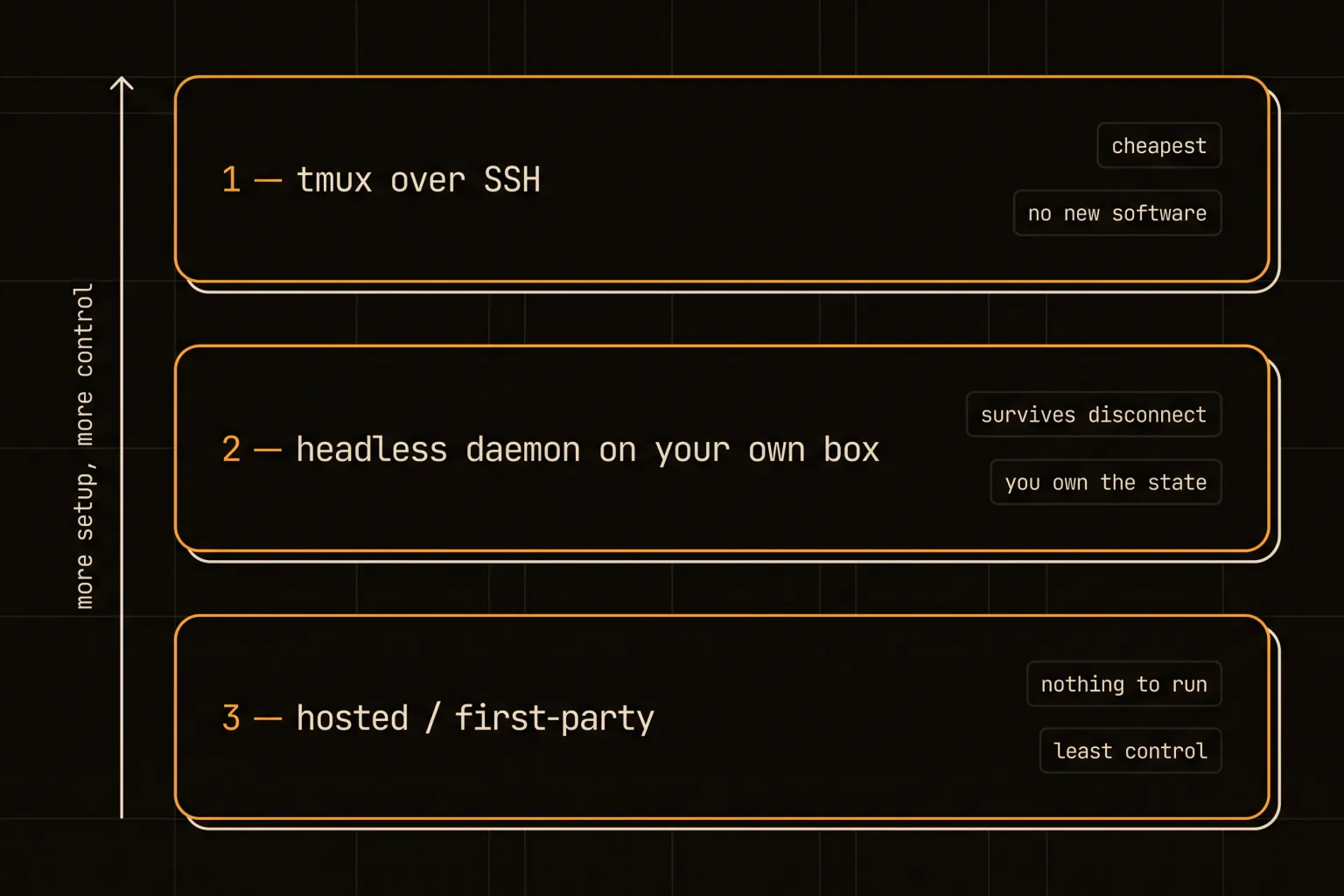
The first is data that cannot leave your network. If the repository, the database, or the customer data is subject to rules that rule out hosted execution, no feature list changes that, and tier 2 is where you live.
The second is hardware. A build that needs 64 GB of RAM, a specific GPU, a hardware security key, or a device on your LAN cannot run on someone else's infrastructure.
The third is models. If you need to mix non-Anthropic models into the same workspace, you are running your own harness by definition.
Outside those three, self-hosting buys you work rather than capability. Be honest with yourself about which one you are in before you spend a weekend on it.
There is a fourth reason people cite that does not hold up: cost. Running your own box to save subscription money rarely works out once you price the droplet, the storage, and the hours you spend maintaining it. A $6/month VPS is cheap; the afternoon you lose to a broken systemd unit is not.
The cheap version: a Claude Code SSH setup
Tier 1 needs no new software and it is where anyone curious should start. A Claude Code SSH session over tmux is 3 commands.
ssh you@your-box
tmux new -s agent          # or: tmux attach -t agent
cd ~/projects/thing && claude
Detach with ctrl-b d, close the laptop, reattach later from anywhere. The session survives because tmux owns the process, not your SSH connection. This covers a surprising fraction of the "I want Claude Code remote" requirement for about 90 seconds of setup.
Two things to know. Your phone is a bad terminal, and no amount of tooling fixes a 4-inch screen with an on-screen keyboard, which is exactly the problem Remote Control solves better. And a bare claude in a detached tmux still stops at every permission prompt, so an unattended session needs its permission posture decided up front rather than discovered at 3am.
That second point deserves more than a clause, because it is the difference between a remote setup that works and one that quietly stalls. An agent waiting on a prompt looks identical to an agent thinking, and you will not notice for hours. Decide before you detach whether the session is allowed to act unattended, and if it is not, give it work that terminates on its own rather than work that will ask a question. Headless runs with claude -p are better suited to this than an interactive session, because they are shaped to finish rather than to wait.
The real version: something owns the state
Past tmux, the design question stops being "how do I connect" and becomes "which machine is the source of truth".
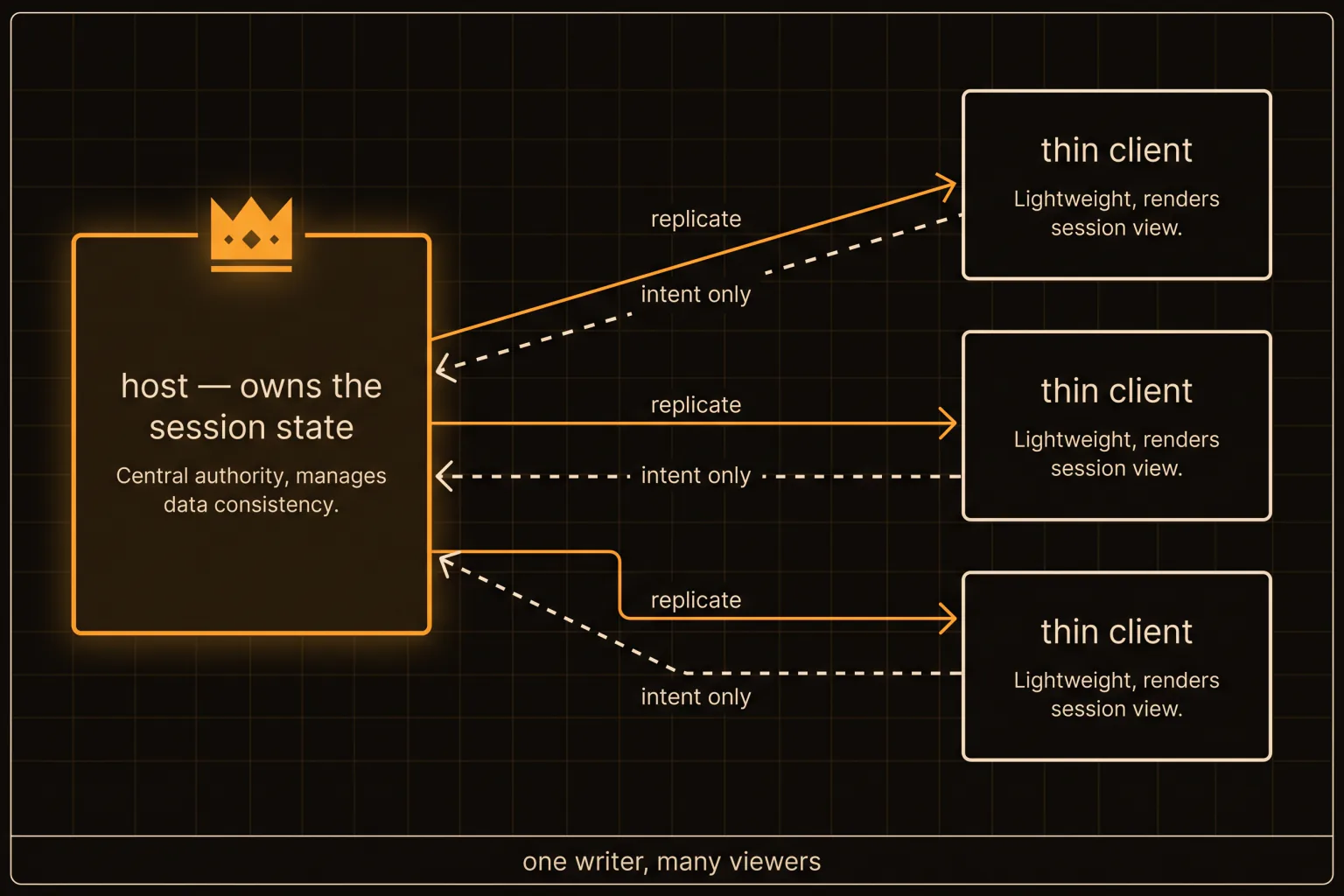
We build this in our own product, so the shape is from experience rather than theory. A Claude Code headless daemon runs on the box that owns the work, and it runs the same event spine as the desktop app rather than a reduced version of it. That detail matters more than it sounds: the moment the daemon is a simplified reimplementation, its behaviour drifts from the app, and you get bugs that only reproduce remotely. Clients replicate from that host and send intent back; they never hold authoritative state of their own. That is what makes a phone safe to use as a client: it cannot disagree with the host, because it was never allowed an opinion.
Our remote-terminal path is an exec-ssh transport plus a multiplexer and a tmux preset, verified against a DigitalOcean droplet rather than only locally. The daemon runs headless on Linux with the same core the macOS app uses.
One negative result worth passing on, because it cost us real time: local echo prediction over a remote link is a dead end. Echoing keystrokes locally before the remote confirms them looks great in a demo and produces visible flicker and wrong characters under a spinner or any full-screen redraw. We shipped it for local PTYs and abandoned it for remote ones. If a tool promises zero-latency typing over a network, be skeptical.
Getting your terminal onto a phone screen properly
If you do run tmux over SSH and insist on a phone, a few settings make the difference between usable and pointless. Set an explicit small window size rather than letting the remote guess, because a mismatched TERM size is what produces the two-column garbage layout that makes people give up. Keep the status bar off. And use a client that supports hardware keyboard shortcuts if you have one, because ctrl-b on a software keyboard is genuinely painful.
Honestly though, this is the section where the first-party answer wins. Remote Control exists precisely so you do not have to make a terminal work on a 4-inch screen, and it is a better experience than any amount of tmux tuning.
Decide who owns the session, then pick a client
Start at the bottom tier and only climb when something forces you. Try Remote Control and a web session first; they cost nothing and cover most of the requirement. Add tmux over SSH when you want a long-running process on a box you control. Build or adopt a host-authoritative setup only when data residency, hardware, or model choice makes the hosted path impossible.
The failure mode to avoid is having two machines both think they own the session. That is not a connectivity problem and no client will save you from it. Pick the owner first, in one sentence, and every other decision here follows from it.
A concrete version of that sentence, for the setup we run: the Linux box owns the session, every other device is a viewer, and anything that needs to survive the box going down is a Routine instead. Write your own equivalent before you install anything. If you cannot say in one line which machine is authoritative, you are not ready to build tier 2, and tier 1 will serve you better in the meantime.
If you are adding parallel agents to any of this, the isolation rules do not change just because the machine is remote — the agent teams walkthrough covers the worktree layout that keeps them from colliding.